Visualizing invisible labor
Procrastination isn’t always laziness — a lot of the time it’s your brain avoiding a task that feels unclear, too big, or too slow to reward you. The fix isn’t motivation. It’s feedback.
The real reason we procrastinate
Procrastination usually isn’t a motivation problem — it’s a feedback problem. Your brain avoids tasks that feel unclear, too big, or too slow to reward you. When there’s no obvious “I’m making progress” signal, the task feels endless, and your attention naturally drifts toward things that give instant payoff.
That’s why ADHD brains get hit especially hard: the hardest part isn’t doing the work — it’s starting when progress feels invisible. If you can’t see effort turning into something real, it’s hard to stay engaged. The fix is simple in theory:make progress loud.
The “game loop” idea
Laurie explains procrastination through the same mechanic that makes video games addictive: the game loop. In a shooter game, the loop is simple: you aim, you shoot, and you instantly see the result — hit or miss — through visuals and sound. That instant reaction is feedback, and it’s what keeps you locked in.
Real life tasks rarely work like that. You study for an hour and the “reward” might show up days later on a quiz — if it shows up at all. But when you build a loop where effort creates immediate feedback (even small feedback), work becomes easier to repeat. The more often the loop repeats, the easier it is to slip into flow.
Why micro-tasks actually work
The most powerful rule from the article is this: the more you procrastinate on something, the more you should shrink it. Not because you’re weak — but because smaller tasks repeat the loop faster. A big task feels like one giant commitment. A micro-task feels like a quick move.
Micro-tasks create “easy wins,” and easy wins create momentum. Even 2–5 minutes counts, because the real goal is to build a starting habit. Once you’re moving, it’s easier to keep going. The win isn’t finishing everything — it’s proving to your brain:“I started, and it worked.”
The receipt printer trick
The thermal receipt printer is basically a physical progress machine. Instead of keeping tasks inside your head (or trapped in an app you never open), it prints them into the real world. That turns effort into something tangible — a list you can hold, stack, and complete.
Then comes the best part: completed receipts go into a clear jar. That’s not just satisfying — it’s a powerful form of feedback. The jar becomes visible proof that you’re moving forward. It removes the “did I do anything today?” feeling and replaces it with something undeniable: a growing pile of evidence.
So what does this mean for studying?
Studying is one of the hardest tasks to stay consistent with because the reward is delayed. You can spend hours reading and still feel like you didn’t make progress — especially when you’re learning something complex. That’s why studying often turns into avoidance: it’s effort with weak feedback.
But if you treat studying like a loop — small action → clear outcome → instant feedback — it becomes easier to repeat. You don’t need to rely on motivation every day. You just need a system that makes progress visible. That’s the mindset behind EstudyLog: turning study time into something you can actually see, not just “feel.”
How EstudyLog turns studying into a feedback loop
The receipt printer works because it creates instant feedback: every action produces something you can see. EstudyLog applies the same idea to studying — each session becomes a “receipt,” and the app turns it into visual proof that makes progress feel real.
Long-term proof (Mastery Widget)
This is your “clear jar.” It shows your total hours, your current level, and how close you are to your next milestone — so your effort doesn’t disappear after you close the app. It stays visible.
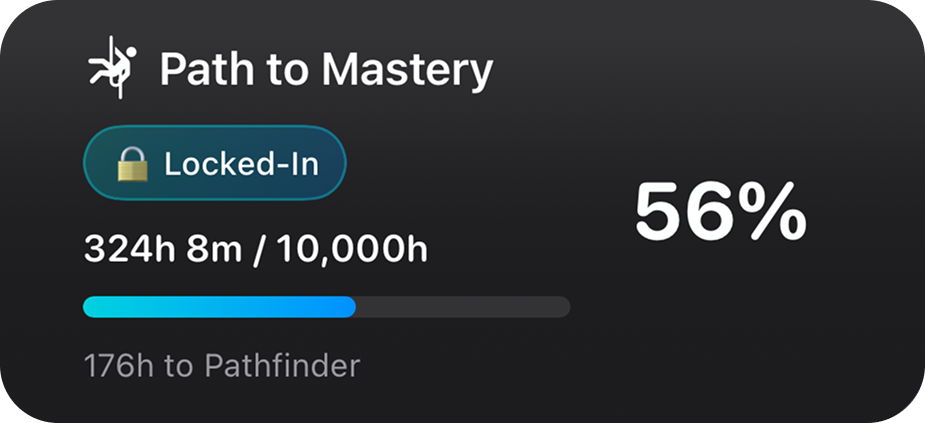
Mastery widget: a long-term progress bar that makes effort feel permanent.
Clear targets (Syllabus Coverage Rings)
Procrastination gets worse when “done” is unclear. The ring charts make studying measurable by showing coverage per topic. Instead of guessing what to study next, you can see what’s underfed and fill the gap.
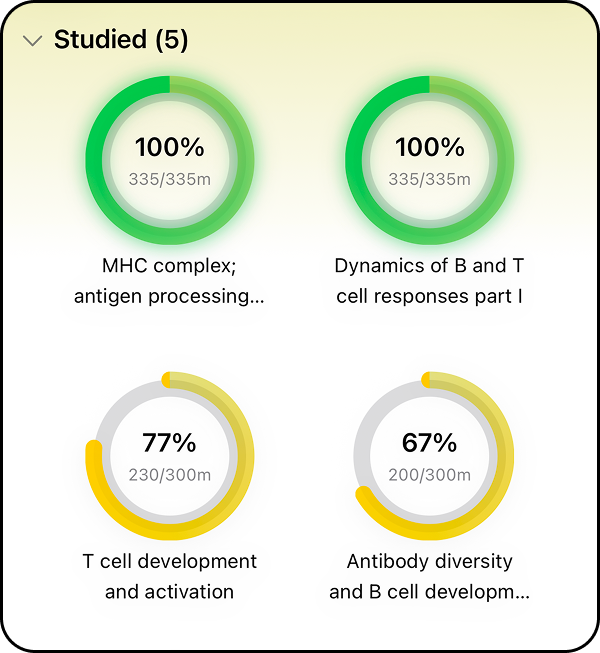
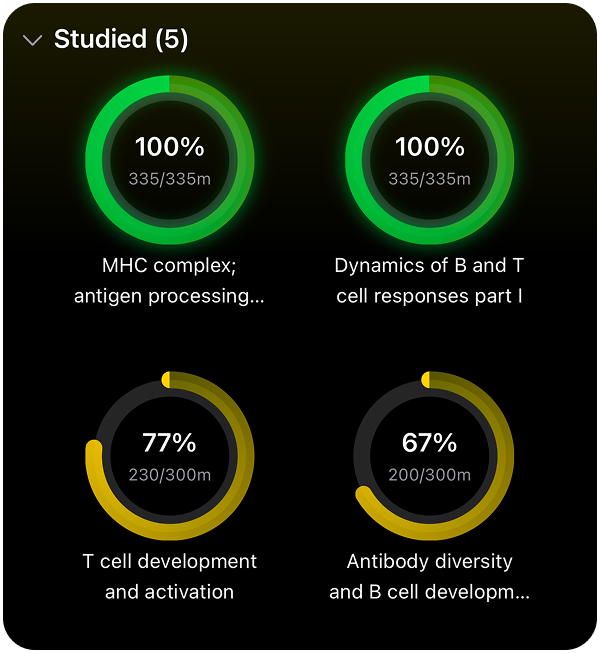
Ring chart: syllabus coverage so you know what needs attention next.
Consistency feedback (Calendar Heatmap)
This is the fastest “did I actually show up?” check. Brighter days mean more study time. It turns your month into a map — so patterns, gaps, and strong weeks become obvious instantly.
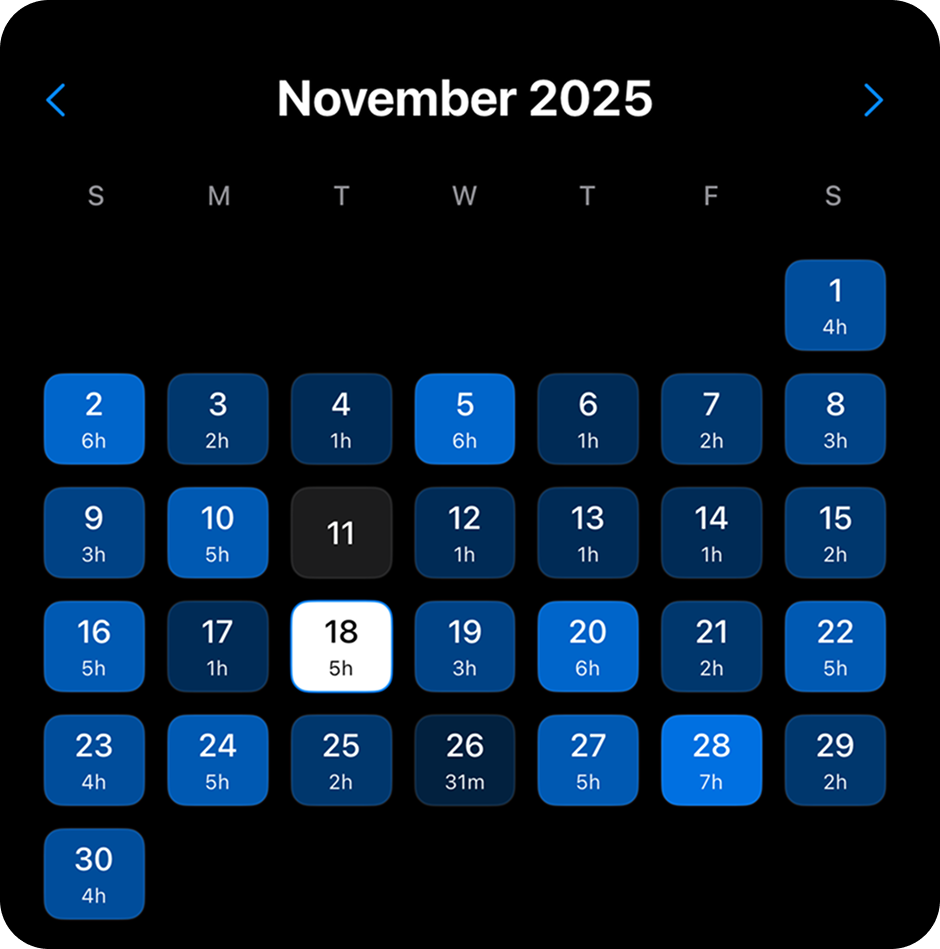
Calendar heatmap: your studying history at a glance, day by day.
Momentum (Streak Card)
Streaks are a simple loop: study today → keep the chain alive → repeat. The streak card adds urgency in a good way, and it keeps your “today” progress visible so you always know what counts as a win.
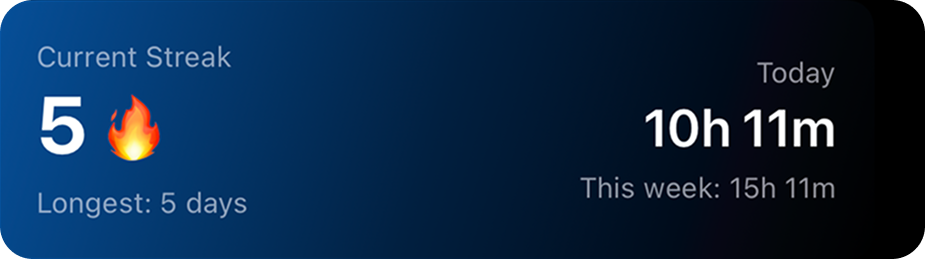
Streak card: today’s progress + your current streak, in one simple view.
How to use this today
The printer story worked because it made every action visible. You can do the same with studying by building a loop that repeats fast and gives you proof right away.
- Start tiny — not perfect. Pick a 10–20 minute session if you’re resisting. The goal is to start the loop, not finish the whole chapter.
- Make the session specific. In EstudyLog, attach a course, choose a session type (Reading / Practice / Review / Assignment), and tag the topic. A clear receipt beats a vague session.
- End with feedback. Rate the session (1–5) and look at the visuals. Even one square on the heatmap is proof your day changed direction.
- Use the rings to decide what’s next. If a topic is low coverage, you don’t need motivation — you have a target. Pick the smallest next step and repeat.
All credit for the receipt-printer method goes to Laurie Hérault — this post simply applies the same idea to studying with EstudyLog.
Quick summary
- Procrastination gets worse when progress is invisible — your brain wants fast feedback.
- Micro-tasks work because they repeat the “effort → feedback” loop more often.
- EstudyLog makes studying visible through streaks, coverage rings, and progress widgets.
Is EstudyLog good for ADHD study routines on iPhone?
Yes — it’s built around visual feedback. Logging sessions turns effort into proof (heatmaps, streaks, and coverage charts) so progress feels real and repeatable.
Can I take notes while the timer is running?
Yes. You can write notes during a session and they stay attached to that session, so you always remember what you studied and why it mattered.
What’s the easiest way to start if I’m stuck?
Start with 10–20 minutes. The goal is to create a quick win and get feedback immediately — not to finish everything in one session.
Want to try it?
If you struggle with starting, EstudyLog is designed to make progress visible and repeatable — so studying feels more like momentum and less like pressure.
Download EstudyLog